
Most people use AI like a vending machine. Ask a question, take the answer, close the tab. Tomorrow it has forgotten you again.
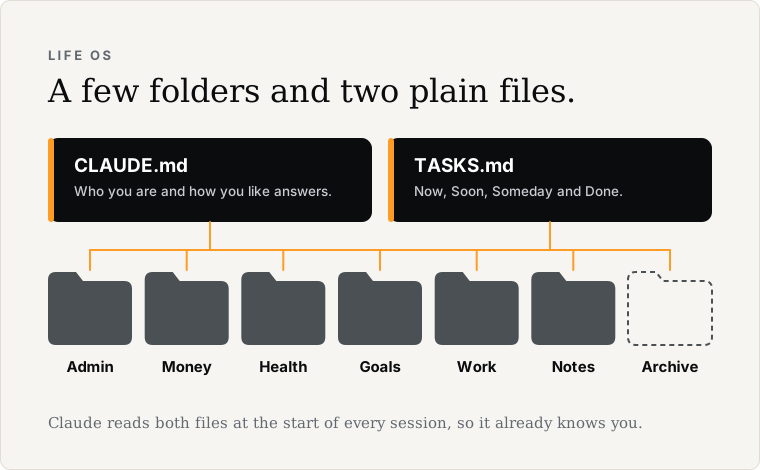
A Life OS fixes that. It isn't an app you buy. It's a few folders and two plain text files that Claude reads at the start of every session, so it already knows who you are and what's on your plate.
I started on ChatGPT and Gemini last year, then moved to Claude when it added Claude Code. The chats piled up and became unwieldy, and with time it became clear I needed a better system. That's how my Life OS was born.
Several iterations later, it has changed how I run my life. I get more done, and the time it saves is massive. Education, research, coding: it's become the hub I manage everything from.
This is the simple version, for anyone who's been using Claude for a few weeks and wants it to stop starting from scratch. Give it an hour this weekend.
Updated 14 October 2026.
Before you start
You'll get the most from this in Cowork, in the Claude desktop app, on a paid plan. Cowork can read and update files in a folder on your computer, so it keeps your Life OS current for you.
If you only use Claude in the browser, a Claude Project works for reading your files. Claude can't update them for you there, which is the main reason to move to Cowork.
1. Make the folders (10 min)
Create one folder called Life OS. Inside it:
- Admin: accounts, insurance, the car, the house
- Money: budget, bills, savings goals
- Health: training, appointments, food and sleep
- Goals: this year's goals
- Work: your job or side business
- Notes: everything else
- Archive: old material. Nothing gets deleted, it moves here
That's your life, roughly. Don't overthink the names.
2. Write CLAUDE.md (15 min)
At the top of the Life OS folder, make a plain text file called CLAUDE.md. It tells Claude who you are and how you like answers. Ten true lines is enough to start:
I'm [your name], based in [your city]. I work as [what you do].
This year I'm working toward [one or two things].
Short, plain answers. No jargon.
For anything with numbers, show your working.
Ask me one question before a long answer.
My folders: Admin, Money, Health, Goals, Work, Notes, Archive.
Never delete anything. Move it to Archive and tell me.
Never store passwords, card numbers or ID scans here.
Then tell Claude to read it. In your Cowork project's instructions, add one line: "At the start of every session, read CLAUDE.md and TASKS.md."
3. Add a TASKS.md (5 min)
One more file, the things on your plate. Four headings: Now (this week), Soon (this month), Someday (ideas) and Done. Claude reads it every session and keeps it updated as you work.
4. Drop in your real stuff (15 min)
Put actual things in the folders. Last month's budget in Money. This year's goals in Goals. A note about your training in Health. Real beats tidy.
5. Run it (15 min)
Open a session and ask for something real. "Read my Money folder and tell me where I'm leaking." "Turn my goals into a plan for this month." "What's on my plate this week?" Watch it use what you gave it.
That's a personal AI operating system. The work lives in the system, not in your head, and it gets a little sharper every week because the files get better.
When you're ready for more
This page is the one-hour version. When it starts to feel useful, these go deeper:
- How to set up Claude Cowork as a second brain. The full setup: the complete CLAUDE.md template, a morning brief and weekly review you can run by name, privacy settings, a worked example and a first-week plan.
- Claude Cowork vs Claude Code: how to use both together. For when you start building things with Claude Code too, and need the two to stop overwriting each other.
- Six guardrails for using Claude Cowork and Claude Code safely. The rules I'd keep if I could only keep a few.
Get the kit
Every folder and template from this page and the full setup guide, ready to drop into Cowork: download the Life OS kit. It's free.
And if you'd rather have it set up with you, on your own tools, book a free intro call. But the guide above is yours, free. Start there.